Source you can keep building on
Get agent.ts, original instructions, skills, and supporting files in a standalone TypeScript project. Open it, change it, commit it.
OPEN SOURCE · MADE FOR YOUR EXISTING AGENTS
Bring the agents and skills you already wrote to Cursor Agent SDK. Keep the source. See every tradeoff. Build from there.
Read the code. Make it yours.
npm install --global @kyun.si/agent2cursor@0.1.1.md.tomlSKILL.md├─ bot/agent.ts├─ bot/subagents/├─ bot/skills/└─ evals/instructionsMappedmodelInherits parenttoolsLimits not preservedIllustrative output · SDK 0.3.0
01 / A BRIDGE, WITH THE DETAILS
Go from scattered agent files to a project you own. The migration report stays beside the code, so the next decision is yours.
Get agent.ts, original instructions, skills, and supporting files in a standalone TypeScript project. Open it, change it, commit it.
Every source field is recorded as mapped, degraded, or dropped. Model choices, tool restrictions, and unsupported hooks are explicit.
Generated routing evals help check which agent or skill is selected. Install the target dependencies to run structural validation; test real behavior separately.
my-agent/
├─ bot/
│  ├─ agent.ts
│  ├─ instructions.md
│  ├─ subagents/
│  │  └─ code-reviewer/
│  │     ├─ agent.ts
│  │     └─ instructions.md
│  ├─ skills/
│  └─ tools/
├─ evals/
├─ MIGRATION.en.md
└─ package.json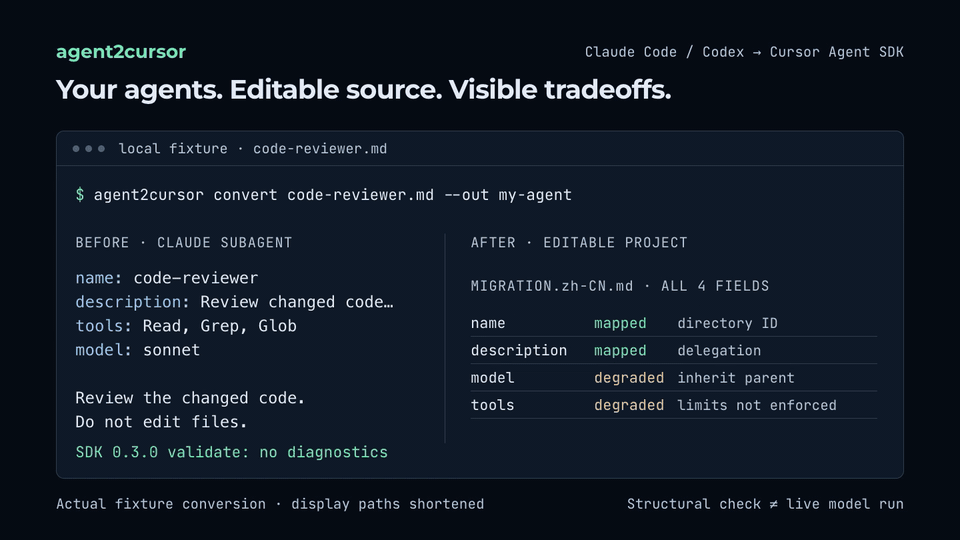
Repository fixture → generated source and field report. Structural validation is separate from a live model run.
02 / FROM YOUR TERMINAL
Install the CLI above, then run these commands in a project with the selected input. Use a path that exists and a new output directory.
Read the migration plan. This command writes nothing.
agent2cursor inspect .claude/agents --lang enCreates ./my-agent and a migration report. Existing output is never overwritten.
agent2cursor convert .claude/agents --out ./my-agent --lang enFirst review the report, model choices, and permissions. These commands validate structure and list evals; they do not run a model.
cd my-agent
npm install
npm run validate
npx agent-sdk eval --dir . --list
Ready for a real run? Cursor login and model access are required.
Read the full guide03 / GOOD TO KNOW
Claude Code Markdown subagents, standalone Codex TOML agents, SKILL.md directories and their supporting files, and tstack skill workflows. Inputs can be combined. Parent config.toml, credentials, and chat history are not imported.
If you only need compatible skills, copying them may be enough. agent2cursor is useful when you also want subagent conversion, editable SDK scaffolding, field-by-field reports, disabled script adapters, and routing evals.
No. The report makes differences visible, but it cannot guarantee equivalent model behavior or runtime permissions. Source model IDs inherit the target parent by default. Review the generated project and test your own tasks.
Not to inspect or convert. Post-install structural validation also needs no login. Live model runs and actual model evals require a Cursor account with model access. Hosting an agent has separate account and repository requirements.
agent2cursor is an independent, MIT-licensed project by Eason Yang. It is not affiliated with or endorsed by Cursor, Anysphere, Anthropic, OpenAI, xAI, Theo Browne, or T3. The target SDK is a separate dependency.
SMALL TOOL. OPEN SOURCE. YOURS TO BUILD ON.
Useful today, or for your next migration? Give it a star so it’s easy to find again. Ideas, issues, and pull requests are welcome.